Category Archives: Cisco

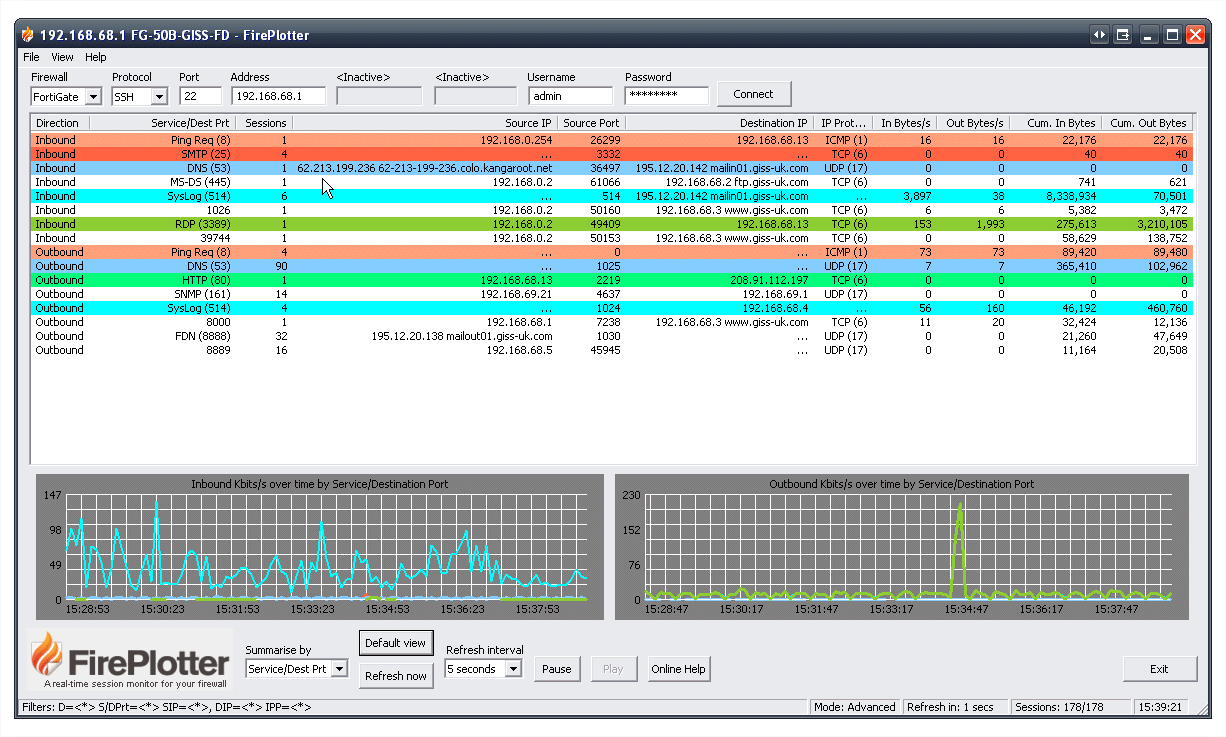
Free Firewall Monitoring Tool – Fireplotter

If you have a Cisco PIX, ASA, or Fortinet firewall, you should checkout this new free firewall monitoring tool. It can tell you what is going on with your Internet connection, real-time. FirePlotter quickly answers questions like “Who is using my bandwidth?”, “What is using my bandwidth?”, Who is eating my bandwidth?” or “What is eating my bandwidth?”. Download FirePlotter here

Download Solarwinds Netflow Net Performance tool for free

Rarely do the words “free” and “netflow tool” appear in the same sentence but today they are…

Do you want to know what traffic is really going through your network, real-time, right now? If so, one of the best options is to enable NetFlow on your Cisco routers then analyze that NetFlow data with a NetFlow Analyzer. Download Solarwind’s Free Real-Time NetFlow Analyzer from the Petri IT Knowledgebase and find out what is really going on in the network!

Cisco & Microsoft new Windows Server on WAAS and Video Learn how to install Cisco WAAS

Cisco and Microsoft jointly announced a new Windows on WAAS option for their Appliance. Through virtualization, the Cisco WAAS Appliance can actually run Windows 2008. The WAAS portion is what accelerates the applications over the WAN and the Win 2008 provides typical remote office networking services like DHCP, DNS, Active Directory (AD), and file sharing, without needing a full Windows Server.

Also, in the video below, you can learn how to install WAAS from a Cisco Engineer:

Cisco To Buy $13M Stake in VMware

On the heels of an expanded relationship announced only last month, Cisco Systems Inc. and VMware Inc. are looking to get even cozier over time. Late last month, Cisco announced plans to take another stake in VMware — to the tune of $13.3 million (or 1.7 percent). Besides Cisco’s Nexus 1000V virtualization switch that integrates with VMware ESX Server “4.0”, Cisco now has a much larger stake in the success of VMware.

For more information, read these stories about the enhanced partnership between VMware and Cisco:

Learn how the Cisco IOS parser command can speed up response time

On routers with large running configurations, the parser cache is used to speed up the “parsing” of that IOS configuration when the configuration is accessed and processed by the router. David Davis explains what the parser cache does and how it can help you. To read the full article, see Learn how the Cisco IOS parser command can speed up response time

Download a free VMware Performance Monitoring tool – VM Monitor

SolarWinds free VM Monitor makes it easy to quickly check the health of your VMware ESX server by monitoring CPU, memory utilization, virtual machine status. The Petri IT Knowledgebase has recently made this tool available to all site visitors. To download your free VM Monitor tool, just visit: Monitor VMware ESX Server Performance for free – VM Monitor

Use extended ping and extended traceroute to better troubleshoot your Cisco network

Every admin is familiar with the well-known troubleshooting commands ping and traceroute. In David’s latest article, he shows you how to use these commands in their extended versions to become an expert at troubleshooting your Cisco network.

To read the full article, visit: Use extended ping and extended traceroute to better troubleshoot your Cisco network

How can PacketTrap Perspective help you manage your Cisco network?

In David’s latest article, he explains how the new network management platform, PacketTrap Perspective, can help you better manage your Cisco network. Topics include:

  • What is the PacketTrap Perspective?
  • How is Perspective different?
  • How can Perspective help Cisco network Admins?

You can read the full article at: How can PacketTrap Perspective help you manage your Cisco network?